AI agents run your delivery process. You decide what merges.
Each stage of your board gets its own agent. An auditor you turn on can check the work before it moves on, a QA agent sends back a video of each test, and by default no agent can merge.
Free, with no workspace limit. Runs on your servers and talks to the model with your own key.
- Agent started on its own branch and sandbox
- Agent finished and pushed the branch
- Auditor checking against the definition of done
- Auditor passed: 3 of 3 criteria met
- QA agent recording the test
- PR #128 ready, checks passing. A person merges it
How it works
One task, from an empty board to a merge
Lay out your stages.
A new board starts as Backlog, In progress, Done. Make it Backlog, Development, QA, Human review, Done, or whatever your team uses. You decide which stages get an agent, which advance on their own, and which wait for a person's approval.
Give each stage an agent.
You write your agents or import them; none come preinstalled. Every agent has its own prompt, model, tools and permissions for each stage. The development agent can push while it's in Development; the QA agent gets a browser in QA.
Create a task and let the agent work.
It works on its own branch in its own sandbox, where it starts your app with the project's init script. Its key lasts 24 hours at most, dies when the run ends, and can only change its own task.
The auditor sends it back if something's missing.
If you turned one on for that stage, an auditor checks the result against your definition of done, in its own container with the repo mounted read-only. The task goes back with the reason, and the next run picks it up from there.
Get a video of every test.
The QA agent runs the app in a real browser, records each case and marks it pass or fail. You watch where it clicked and what it was checking.
A person approves and merges.
The task shows the PR with its CI and review. Someone on your team reviews and merges. Agents can ask for approvals but never give them, and merging is a tool no write permission includes: an admin has to name it on the stage.
Drawings with made-up data. The captures further down are the real dashboard.
Try it in two commands
curl -fsSL https://github.com/MisterDonnuts/thulu/releases/latest/download/install.sh | sh
thulu init
You need Docker with Compose. The wizard asks what it has to know, and the Setup page shows what's left: agents, a GitHub credential, a model key and your first project.
Governed pipeline
Your process, with agents that follow it
Your team already has rules: what gets reviewed, who signs off, what doesn't merge without tests. In Thulu those rules live on the board.
- Stages that fit your team. Up to 32 per board and 64 boards per workspace. Task types can skip stages, so a hotfix doesn't go through refinement.
- An auditor on the stages you choose. You turn it on per agent and stage; none is on by default. It runs in its own container with the repo mounted read-only. It passes the task, kicks it back to another stage, blocks it, or asks for more turns.
- Approval gates. A stage can require a person's sign-off before a task leaves it, and an agent that spots an architecture decision or an infrastructure change can ask for one. The task stays put until a person approves. Agents can ask for approvals but never give them. Request changes, and the agent picks the work back up.
- The PR inside the task. Each PR shows how many CI checks passed, the review state, whether it's ready to merge and what's blocking it, without opening GitHub (the full count uses the GitHub App's Checks permission).
- Agents ask instead of guessing. When an agent needs something only a person knows, it asks in the task and waits. Once you answer, the run resumes where it stopped.
Show 6 more
- Talk to the agent while it works. Message it from the task or @mention it in a thread, and it answers right there (Claude Code on Docker; on Kubernetes, or with Codex and OpenCode, the message waits for the run to end).
- The agent handles the review. It replies to and resolves review threads, requests reviewers, manages labels and reads the PR's checks (with the same Checks permission; without it, only the Actions jobs). It can't close a PR.
- A chat that works for you. With "Act for me", a chat that isn't tied to a task creates, edits and moves tasks across your boards for 8 hours, and with the GitHub App opens PRs in your repos. Deletes, merges and deployment approvals wait for you to confirm them. An owner can turn it off for the whole workspace.
- Dependencies. A task won't start until the task blocking it reaches a final stage like Done.
- Subtasks, and a board you can drive from the keyboard. Subtasks keep their own order and can wait on a sibling. The whole board works from the keyboard: arrow keys, Space picks up and drops a card, M moves it, P sets priority. Light and dark mode.
- Automations. Create tasks on a schedule, on a GitHub event, or when a metric crosses a threshold.

QA on video
Every test comes back with a video
The QA agent starts your app in the task's sandbox, tests it in a real browser and records what it does. You don't have to take "I tested it" on faith.
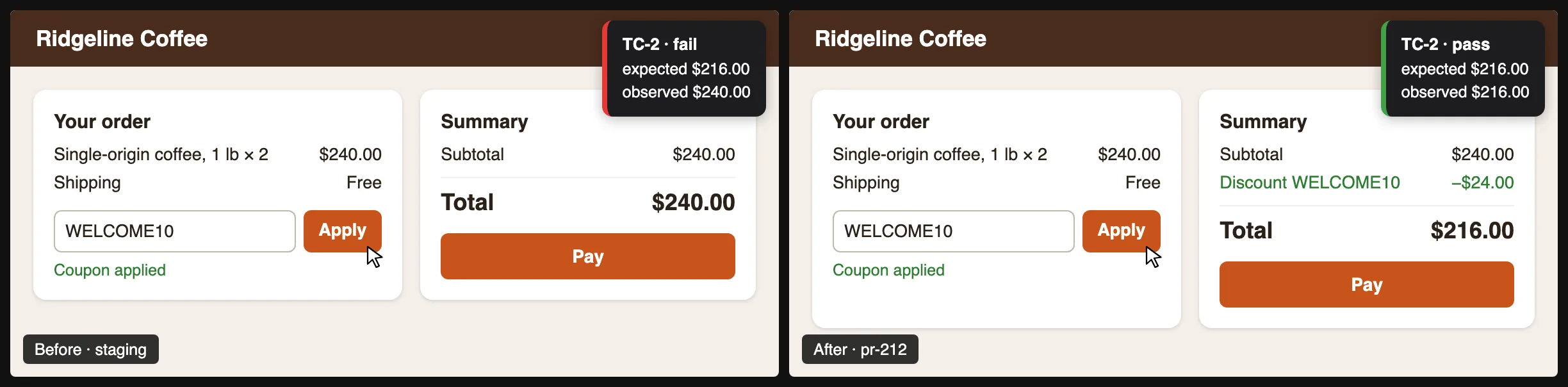
- Video with cursor and captions. See where it clicked and what it was checking, with the dead time cut out.
- Pass or fail, measured. Every case has a check that the tool measures, and measures again each time the test replays.
- Before and after. The same test against the old version and the new one, side by side.
- The app up in every task. Each project has an init script with its parameters, ports and a "ready" check. The agent runs it when it needs the app; if your app changed and the script fails, the agent fixes it, and the new revision is recorded with the agent as author in the audit log.
- Test cases with a history. TC-1, TC-2: each with its steps, expected result, and every run with its verdict and video.
Show 4 more
- Tests you can rerun. The take is saved to your repo as JSON and replays on another task.
- Annotated screenshots. Numbered steps, with sensitive data blacked out.
- One view for all of it. The "From tasks" tab in Evidence lists every case in the workspace, filterable by status, board and project.
- No full reinstall per task. Each workspace keeps its npm, Go and pip caches and its toolchains on a volume of its own. With the setup phase of the project's init script, Thulu prewarms the dependencies of the main branch and a task restores them instead of installing; if your branch changed the lock file, it installs only what is missing.

Security and control
Runs on your servers. Talks to the model with your key.
Your infrastructure
- Thulu
- Postgres
- Agent containers
- LLM provider, on your key
- GitHub
- Your model key. Claude through Anthropic, Bedrock or Vertex. Code the agent reads goes to the provider you chose, on your key. We never see your tokens and we don't resell them.
- The key stays out of the agent. A gateway inside Thulu gives each run its own token and revokes it when the run ends. A Claude Pro/Max OAuth token does not go through the gateway.
- One key per run. Each container gets a key that lasts 24 hours at most, dies when the run ends, and can only change its own task.
- No agent merges by default. Merging is a tool that no write permission includes: an admin has to name it on the stage.
- Hash-chained audit log. 62 event types, each chained to the one before, verifiable through the API and copied to stdout, stderr or an NDJSON file.
Show 6 more
- Your GitHub token stays out of the agent. Thulu publishes the branch to GitHub with a token scoped to the repo. On Docker, Thulu does the commit and push; on Kubernetes the agent uses plain git in its own copy (commit, rebase, push), the push goes through Thulu, and no commit gets dropped.
- SSO through your IdP. Okta, Entra ID, Google, Keycloak or any OIDC provider, or GitHub. Thulu stores no passwords.
- Your team joins by invitation. Enter the email and the role, then share the link; Thulu doesn't send the email. The person lands with that role on their first sign-in, and the invitation takes a seat.
- Strong isolation on Kubernetes. A namespace per team, deny-by-default NetworkPolicy, and Kata or gVisor required. Validated on a single node; needs a paid license (Team or Enterprise).
- Signed binaries. The installer checks the SHA-256 and, if you have cosign, the signature.
- Self-hosted today; managed cloud: closed beta, invitation only. Self-host with Docker Compose or Kubernetes. How the cloud beta works.
Metrics and cost
What each task cost, and where it got stuck
- Cost per task. Cost and tokens by agent, model, project, tool and skill, plus your 20 most expensive tasks.
- Flow metrics. Lead time, time in stage, rework, auditor kickbacks, first-pass rate and cost per finished task.
- Your app's metrics. Send them over OTLP; they show up on a chart once an admin approves them.
- Prometheus.
/metricsexposes the daemon's metrics to your monitoring.

Pricing
Self-hosted
Prices in USD. Team is billed monthly, or yearly with two months free ($3,990/yr up to 10 people). Enterprise is a yearly contract, paid by invoice or bank transfer.
| Free | Team | Enterprise | |
|---|---|---|---|
| Price | Free | $399/mo up to 10 people, plus $20/mo for each person from the 11th | $15,000/yr up to 25 people, plus $30/mo for each person from the 26th |
| Team size | Up to 4 people | From the 5th person | Any size |
| Board, stages, agents, auditor, QA on video | Yes | Yes | Yes |
| Docker sandbox | Yes | Yes | Yes |
| Audit log in the UI, SSO via OIDC or GitHub | Yes | Yes | Yes |
| Multiple workspaces | Yes | Yes | Yes |
| Audit log export (CSV/NDJSON) | Not included | Yes | Yes |
| Kubernetes runtime (Kata/gVisor, namespace per team) | Not included | Yes | Yes |
| Support | Docs and GitHub | Email, business hours | Contractual SLA and a named contact |
| Contractually supported versions | Not included | Not included | Yes |
Free
- Price
- Free
- Team size
- Up to 4 people
- Board, stages, agents, auditor, QA on video
- Yes
- Docker sandbox
- Yes
- Audit log in the UI, SSO via OIDC or GitHub
- Yes
- Multiple workspaces
- Yes
- Audit log export (CSV/NDJSON)
- Not included
- Kubernetes runtime (Kata/gVisor, namespace per team)
- Not included
- Support
- Docs and GitHub
- Contractually supported versions
- Not included
Team
- Price
- $399/mo up to 10 people, plus $20/mo for each person from the 11th
- Team size
- From the 5th person
- Board, stages, agents, auditor, QA on video
- Yes
- Docker sandbox
- Yes
- Audit log in the UI, SSO via OIDC or GitHub
- Yes
- Multiple workspaces
- Yes
- Audit log export (CSV/NDJSON)
- Yes
- Kubernetes runtime (Kata/gVisor, namespace per team)
- Yes
- Support
- Email, business hours
- Contractually supported versions
- Not included
Enterprise
- Price
- $15,000/yr up to 25 people, plus $30/mo for each person from the 26th
- Team size
- Any size
- Board, stages, agents, auditor, QA on video
- Yes
- Docker sandbox
- Yes
- Audit log in the UI, SSO via OIDC or GitHub
- Yes
- Multiple workspaces
- Yes
- Audit log export (CSV/NDJSON)
- Yes
- Kubernetes runtime (Kata/gVisor, namespace per team)
- Yes
- Support
- Contractual SLA and a named contact
- Contractually supported versions
- Yes
Thulu doesn't enforce the team sizes. Only the features in ee/ need a license key.
To buy Team or Enterprise, open a question on GitHub.
Cloud
Per seat, with your own model key. The managed cloud is a closed beta, invitation only.
| Free | Team | Business | Enterprise | |
|---|---|---|---|---|
| Price | $0 | $39/seat/mo ($32 billed annually) | $79/seat/mo ($65 billed annually) | Custom |
| Seats | Up to 4 | Up to 20 | Unlimited | Unlimited |
| Agents running at once | 1 | 5 | 15 | Dedicated pool |
| Runs per month | 100 | 1,000 | 5,000 | Custom |
| Multiple workspaces and audit export | Not included | Not included | Yes | Yes |
| Contract and DPA | Not included | Not included | Not included | Yes |
Free
- Price
- $0
- Seats
- Up to 4
- Agents running at once
- 1
- Runs per month
- 100
- Multiple workspaces and audit export
- Not included
- Contract and DPA
- Not included
Team
- Price
- $39/seat/mo ($32 billed annually)
- Seats
- Up to 20
- Agents running at once
- 5
- Runs per month
- 1,000
- Multiple workspaces and audit export
- Not included
- Contract and DPA
- Not included
Business
- Price
- $79/seat/mo ($65 billed annually)
- Seats
- Unlimited
- Agents running at once
- 15
- Runs per month
- 5,000
- Multiple workspaces and audit export
- Yes
- Contract and DPA
- Not included
Enterprise
- Price
- Custom
- Seats
- Unlimited
- Agents running at once
- Dedicated pool
- Runs per month
- Custom
- Multiple workspaces and audit export
- Yes
- Contract and DPA
- Yes
You pay your model provider directly for usage. Thulu shows you where every dollar went.
Want us to set it up? Implementation runs $3,000 to $6,000: installation, stages and agents tuned to your stack, GitHub connected, and your first QA flows. Or start with a 60-day pilot for $2,500, credited toward your first year if you sign. Ask on GitHub.
FAQ
Which models does it use?
Claude through Claude Code, the main engine: Sonnet, Opus and Haiku, through the Anthropic API, Bedrock or Vertex, or behind your own proxy such as LiteLLM. Codex runs OpenAI's models with your OpenAI key, and OpenCode reaches OpenAI-compatible APIs such as DeepSeek. Each agent picks its engine and model, and its auditor can use a different one.
Where does it run?
On your servers, with Docker Compose or Kubernetes. Self-hosted today; managed cloud: closed beta, invitation only. Self-hosted needs Postgres; the Docker Compose setup brings one if you don't have it.
What happens to my code?
When you self-host, the repo is cloned on your servers and each task works in its own worktree. Code the agent reads goes to the LLM provider you chose, on your key, the same as when a developer uses a coding agent. None of it reaches Mister.D.
How much will the model cost me?
You pay your provider directly for what your agents use. The usage page shows the cost of every task, agent and model from day one.
Do I need Kubernetes?
No. Docker Compose is enough to start. Kubernetes with Kata or gVisor adds strong per-team isolation and egress control, and needs a paid license (Team or Enterprise). It's validated on a single node. On Kubernetes, a run that doesn't fit the workspace quota waits in line and starts on its own once there's room.
Does it work with GitLab or Bitbucket?
No. Among Git providers, only GitHub, including GitHub Enterprise Server for sign-in. It connects through a GitHub App that issues tokens scoped to each repo. You can also create a project by uploading a folder or a .zip (up to 200 MiB compressed): Thulu hosts the repo, agents work on it the same way they work on a GitHub clone, and "Merge into" integrates the task's branch, with no PR, inside the repo Thulu hosts.
What doesn't it do?
It isn't a swarm: each task has one agent per stage, plus the auditor. There's no GitLab or Bitbucket. Evidence covers web apps in Chromium, also at phone size, not native mobile apps. There's no native Slack or Jira integration, only outgoing webhooks and automations with HTTP steps. It has no SOC 2 or ISO certification. And we don't publish a figure for model cost or for how much faster you'll ship: you measure both on your own tasks.
Which agents come with it?
None are preinstalled: your team defines its agents (prompts per stage, skills and tools) for your stack, or imports them with one command. From the Workshop, an admin installs agents and skills from a catalog and sees the plan before applying it, and exports an agent as JSON to import it into another workspace. Today that catalog holds two sample agents and one sample skill. What Thulu does ship is a set of system skills that teach any agent how to work inside Thulu: how a run works, how to ask a person or request an approval, how to write test cases and record browser evidence.
Can an agent merge?
Not by default. Merging is a tool (pr_merge) that no write permission includes: an admin has to name it on the stage where they want it. In a chat, a merge waits for you to confirm it.
Is it available in Spanish?
Yes. The dashboard, the API, the CLI and the messages Thulu writes into tasks come in English and Spanish. Each person picks the dashboard's language in Settings.
How do I install it?
curl -fsSL https://github.com/MisterDonnuts/thulu/releases/latest/download/install.sh | sh
thulu init
The wizard asks whether you want Docker Compose or Helm (the Kubernetes runtime needs a paid license), your IdP, your database and which tools to install. After that, the Setup page shows what's left: agents, a GitHub credential, a model key and your first project. The installation guide walks through each step.
Is it open source?
Yes. The core is open source (AGPL-3.0). With it you run Thulu on Docker for free, with as many workspaces as you want. The paid features need a license key: audit export, the Kubernetes runtime and Stripe billing for a hosted service. All three live in the ee/ folder, source visible, under the Thulu Enterprise License. Using Thulu doesn't make you publish your own code; the AGPL covers changes you make to Thulu itself if you offer it as a service. The code is on GitHub.
What support do I get?
Free comes with the docs and support on GitHub. Team includes email support during business hours, and Enterprise gets a contractual SLA and a named contact. Every paid license includes updates and security patches while it's active.
Try it on one of your own tasks
Install Thulu for free and set up your first board, or ask us on GitHub for a 60-day pilot on one of your team's repos.