

What is Thulu
Thulu is a task board with agents. Each task moves through columns (stages), and when it enters a column that has an agent assigned to it, Thulu starts a run: the agent works the task in its own container, on the task-<id> branch of each of the task’s repos. At the end the branch is published to GitHub and Thulu can open one pull request per repo. It runs on your servers and talks to the model with your own key: each workspace holds its own (with Claude Code: Anthropic, Amazon Bedrock or Google Vertex), and you pay your provider for the model separately.
You install it on your server with Docker Compose or Kubernetes. There is also a SaaS version at octopus.misterd.dev, in closed beta by invitation. The model is the same in both cases.
How it all fits together
Section titled “How it all fits together”Everything lives inside a workspace. Nothing is shared between workspaces: an agent, a credential or a board in one does not show up in another.
Workspace (members with a role: viewer, developer, admin, owner)├── AI engines ............ model key, per profile├── Credentials ........... GitHub, AWS, GCP, Figma and external MCPs├── Projects .............. a GitHub repo or an uploaded folder│ ├── Stage template default agent for each agent column│ ├── Init script how to bring the app up in a sandbox│ └── Environments dev, staging, prod (for Evidence and metrics)├── Boards│ └── Stages (columns) .... default agent, advance, push, open PR, approvals│ └── Tasks ........... repos, agent per stage, subtasks, threads, TC-n cases│ └── Runs one each time an agent works├── Agents ................ valid stages, and per stage: turns, skills, MCP, prompt, auditor├── Skills ................ markdown instructions granted per agent and stage├── MCPs .................. tool servers the agent can call└── Evidence .............. library of EV-n cases that run on their own per environmentWhat happens when a task enters a column
Section titled “What happens when a task enters a column”-
You move the card (or the task advances on its own from the previous column). If the column asks for approval on entry, the task waits there and the approval shows up in “Inbox”.
-
Thulu looks for the agent the task has assigned for that column. That agent was copied from the project’s “Stage template” when the task was created, or someone picked it in the “Agent” property. If there is none, the task stays put and the card says so (“No agent” or “Did not start”, with the reason). Start and end columns never run agents.
-
The run starts (or waits in the queue if there is no room): a new container with the agent, the
task-<id>branch of each repo, the task description and, for that stage, the prompt, skills and MCPs the agent has been granted. It runs with the key of the agent’s profile or, if it didn’t pick one, with the engine’s default profile.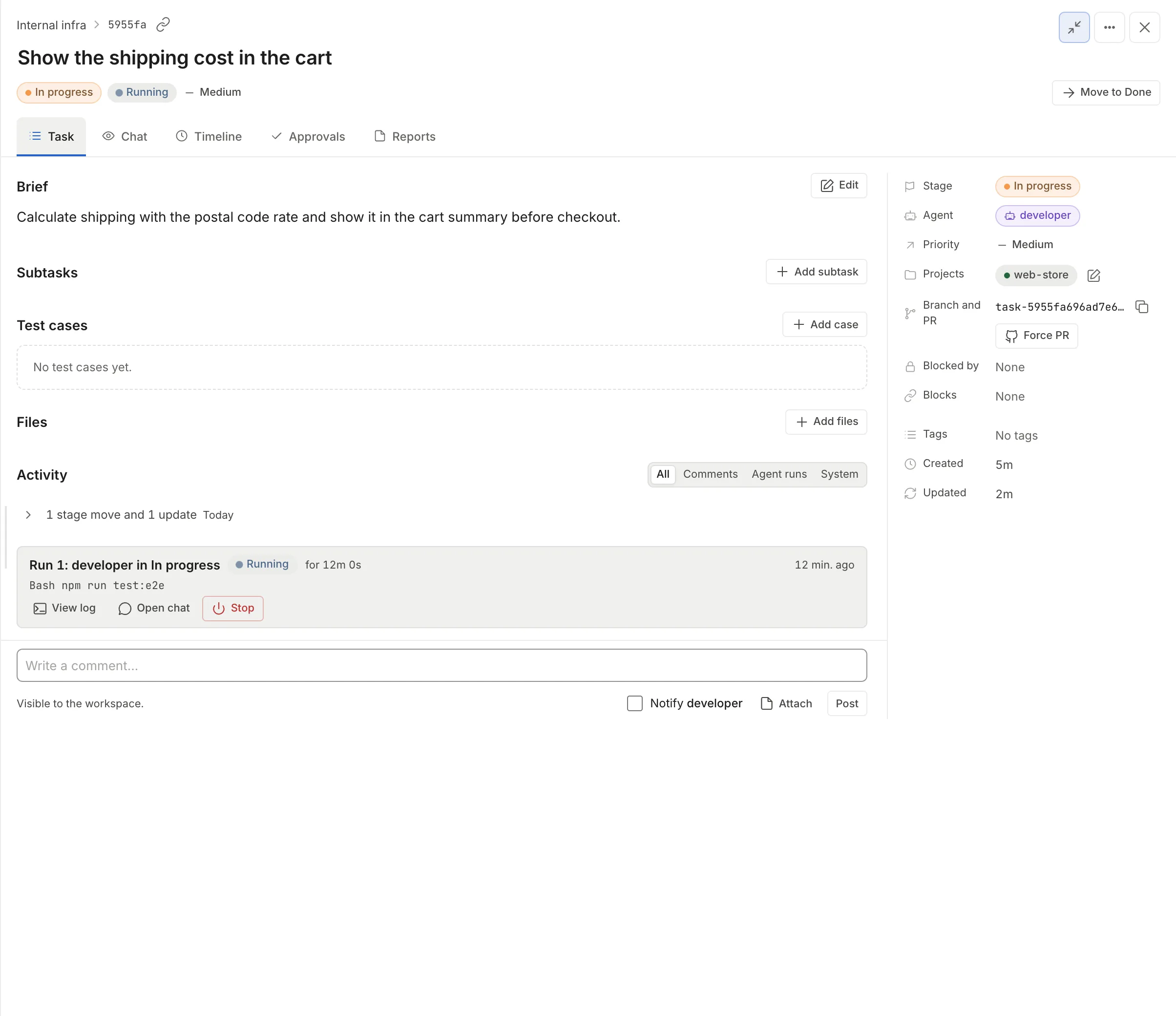
A run in progress seen from the task: status, how long it has been going, the last action and the actions to follow it or stop it. -
While it works, the agent can ask questions (they arrive in “Inbox”), ask for more turns, bring up a sandbox to test the app or film test cases with the browser, depending on the MCPs it has.
-
If the agent has an auditor on that stage, another container reviews the work when it finishes and decides whether it goes on, whether the task goes back, whether it stops or whether the agent ran out of turns. The auditor is turned on per agent and stage, can run on a different engine than the agent, and a new workspace has none turned on.
-
Whatever is left on the branch gets committed. In Docker, Thulu does it, because the agent sees
.gitread-only; in Kubernetes the agent commits and rebases with git in its own copy. If the column has “Push the branch”, Thulu publishes it to GitHub with the project’s token, which never enters the agent’s container. If it has “Move on when the agent finishes”, the task moves to the next column. A column with “Open a pull request” opens the PR for each repo that doesn’t have one yet. The team decides on the merge: by default no agent merges.
A task has at most one agent per column. Other agents join the task when someone mentions them with @ in a task thread, or from the side chat.
Who decides what
Section titled “Who decides what”| Question | Where it’s defined |
|---|---|
| Which agent works in a column | The task’s “Agent” property, which copies the project’s “Stage template” when the task is created. The template is set in the project or from “Default agent” in the column’s Behavior, and the agent must have that column in “Valid stages”. |
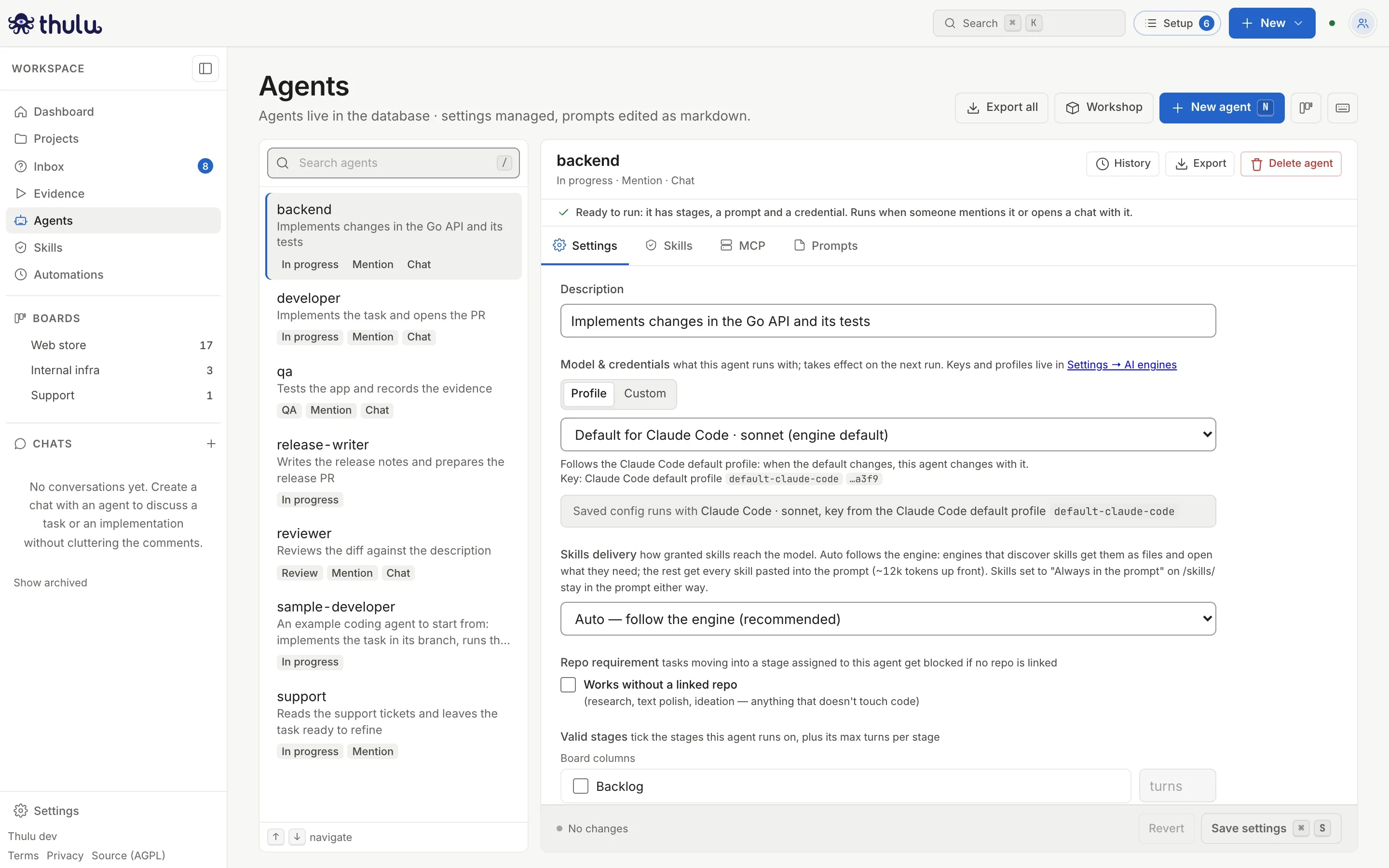
| With which model and which key | The agent’s profile, or the engine’s default profile in Settings, “AI engines”. |
| Which repo it works in | The projects linked to the task. Without a project there is no branch or PR. |
| Which tools it can use | The MCPs checked in the agent’s “MCP” tab, for that stage. The merge (pr_merge) and deploy tools are not granted by any scope: an admin names them one by one. |
| What it knows and how it works | The stage prompt and the skills granted for that stage, plus the system skills that come with its MCPs. |
| How many turns it has | The agent’s “Valid stages”: 20 by default, 30 per message in chat. |
| When it stops and asks permission | The column’s approvals and the agent’s questions. Both arrive in “Inbox”. |
| What happens next | The column’s switches: advance, push, open PR. |
Glossary
Section titled “Glossary”| Term | What it is | Where it’s configured |
|---|---|---|
| Workspace | A team’s space, with its members, boards, projects, agents, skills and keys. A self-hosted installation has no limit on workspaces; on SaaS an account can own up to 2. | Workspace menu, at the top of the sidebar. Workspaces and team |
| Project | A GitHub repo cloned into Thulu, or an uploaded folder that Thulu hosts as a repo, with its description (which goes into the agents’ prompt), its stage template, its init script and its environments. | “Projects”. Projects |
| Board | A set of columns the tasks move through. A new workspace comes with one that has three columns. | “Edit board”. Boards and stages |
| Stage | A board column, with switches that say what happens on entry and on exit. On the agent, “Mention” and “Chat” also count as stages. | The column’s “Behavior”. Boards and stages |
| Task | The unit of work: title, markdown description, repos, agent per stage, subtasks (one level, same branch and PR) and dependencies. | “New” > “Task”. Tasks |
| Agent | A workspace definition: which stages it can work, with which model, how many turns, and with which prompt, skills and MCPs in each. | “Agents”. Agents |
| Skill | Markdown instructions the agent reads when they help. The workspace’s skills are granted per stage; the system skills (octopus-*) arrive with their MCPs. |
“Skills”. Skills |
| MCP | A tool server: octopus-api (read and write in Thulu), argus-github, argus-browser, argus-sandbox, argus-cloud, argus-figma (off by default), or your own. All but argus-sandbox and the per-run browser go through the daemon, so the agent never sees their URLs or credentials. |
The agent’s “MCP” tab. MCPs |
| Run | One session of an agent on a task. States: running, queued, needs an answer, needs approval, out of turns, failed, stopped by the auditor, did not start. | Shown on the task. Agent runs |
| Auditor | A second pass, in another container, that reviews what the agent did in a stage (5 turns by default). | The agent’s “Auditor per stage”. Agents |
| Sandbox | A separate container per task where the agent runs the app, executes commands and shares a preview URL. | The argus-sandbox MCP on the stage and the project’s init script. Sandbox |
| Evidence | The library of EV-n cases for web applications: an agent records them once with the browser, and afterward Thulu replays them without a model in each environment, by hand, on a schedule, after each deploy or from CI. | “Evidence”. Evidence |
| Test case | A TC-n case inside a task, which an agent runs with the browser and films before and after. | The task’s “Test cases” block. Test cases and videos |
| Inbox | The tray with the agents’ questions and the approvals waiting for a person. | “Inbox”. Inbox |
| Thread and mention | A comment in the task’s activity; writing @agent wakes that agent in the thread. |
The “Task” tab, activity. Conversation and threads |
| AI engine and profile | The engine (Claude Code, Codex or OpenCode) and the key it runs with. The default profile is the one used by agents that don’t pick one. | Settings, “AI engines”. Credentials and engines |
| Credential | A GitHub, AWS, GCP or Figma token, or the credential of an external MCP, used by the MCPs and the projects. | Settings, “Credentials”. Credentials and engines |
| Automation | A YAML recipe triggered on a schedule, by an event, by a metric or by hand, that creates tasks, mentions agents or calls APIs. | “Automations”. Automations |
| Workshop | A small catalog of example agents and skills that you install after previewing a plan, plus JSON import and export of agents and skills between workspaces. | “Workshop”. Workshop |
| Operator workspace | The workspace of whoever operates the installation. Its admins see Infrastructure, the beta access list and the custom MCPs, and only its owner can load a Claude subscription token. | The OCTOPUS_OPERATOR_WORKSPACE variable. Settings |
A newly created workspace
Section titled “A newly created workspace”A new workspace comes with the “Default” board and three columns (Backlog, In progress and Done, in the interface language until someone renames them), no agents and no column with a default agent. You can create tasks and move them, but nobody works them. The “Setup” button, at the top right, lists what is missing for an agent to work: the model key, the git credential, the first project, an agent, a column with a default agent and each project’s template.
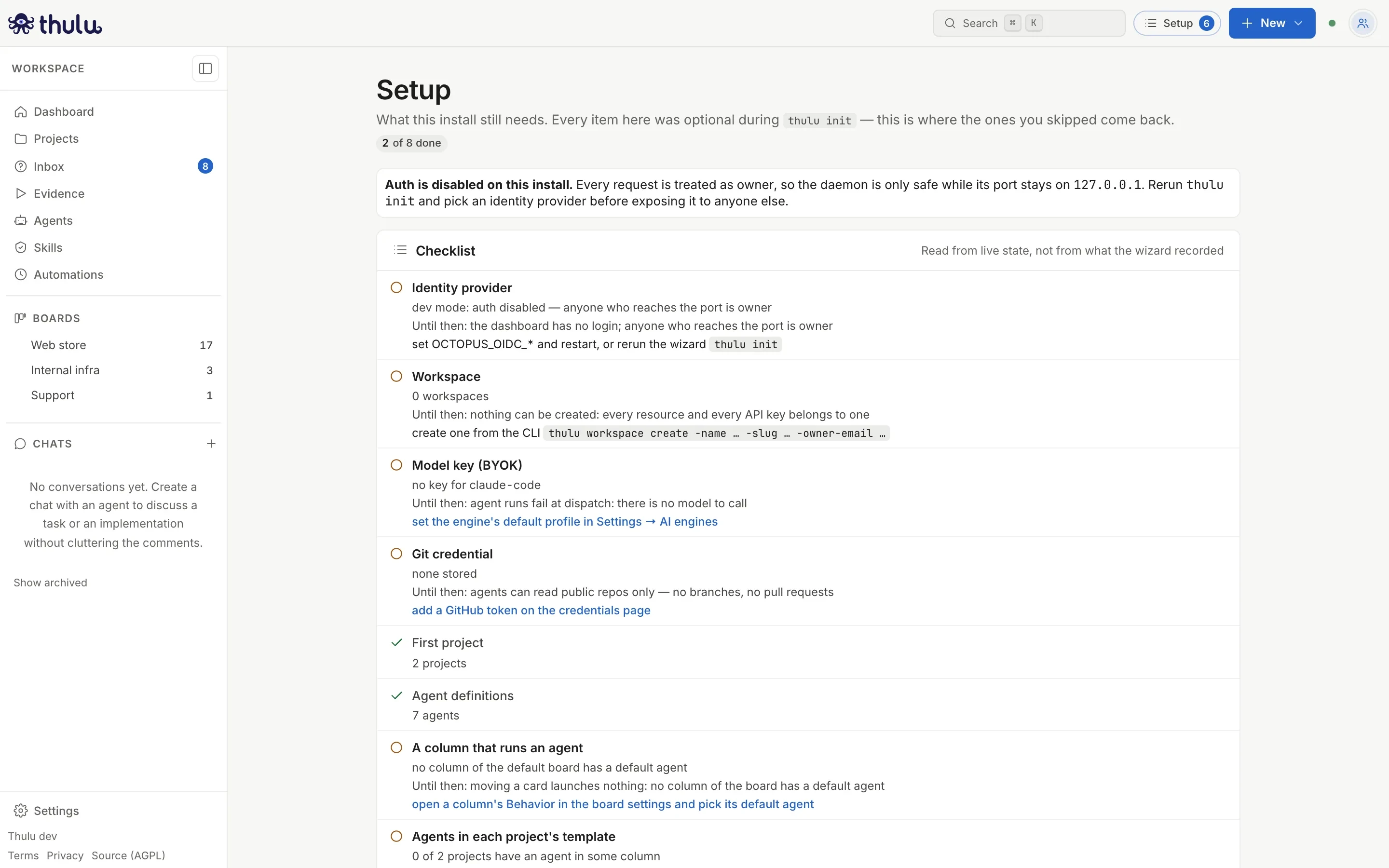
For an agent to work the first task you need four pieces: the key in “AI engines”, a project with its repo, an agent with the column in “Valid stages”, and that agent chosen for the column, in “Default agent” or in the project’s “Stage template”. If you already have a project, when you create the agent Thulu offers to put it to work on a column of the default board. The full walkthrough, with every screen, is in Recommended flows.